
Skip to content

Gym log · Workout tracker · AI coach

The program you already follow. Now it runs itself.

Snap your notebook, drop in your coach's PDF or spreadsheet, and Fortium turns it into your program. Every set shows what to lift next. The AI coach suggests changes, and only you say yes.

Coming soon to theApp StoreSee how it works

Free to log · No sign-up wall · No ads · No tracking

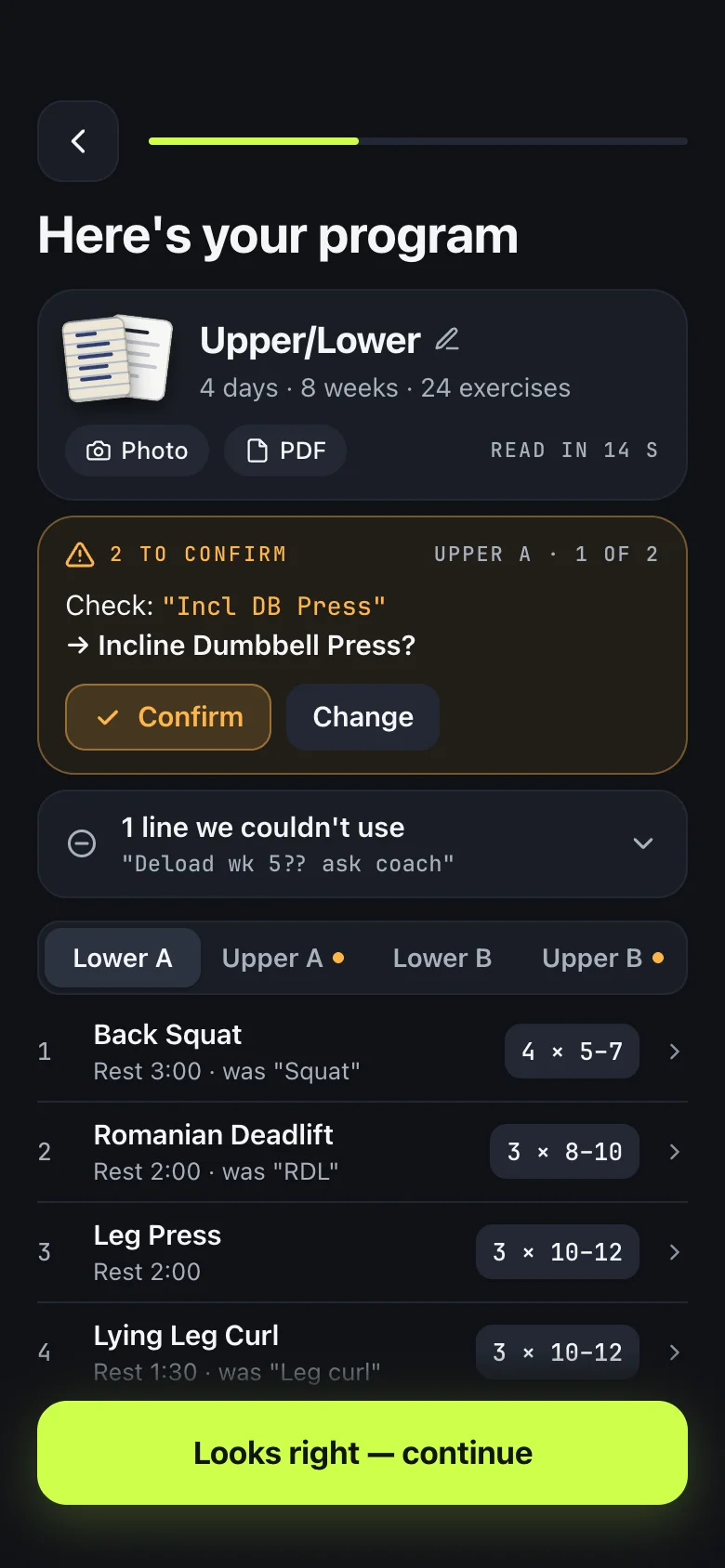
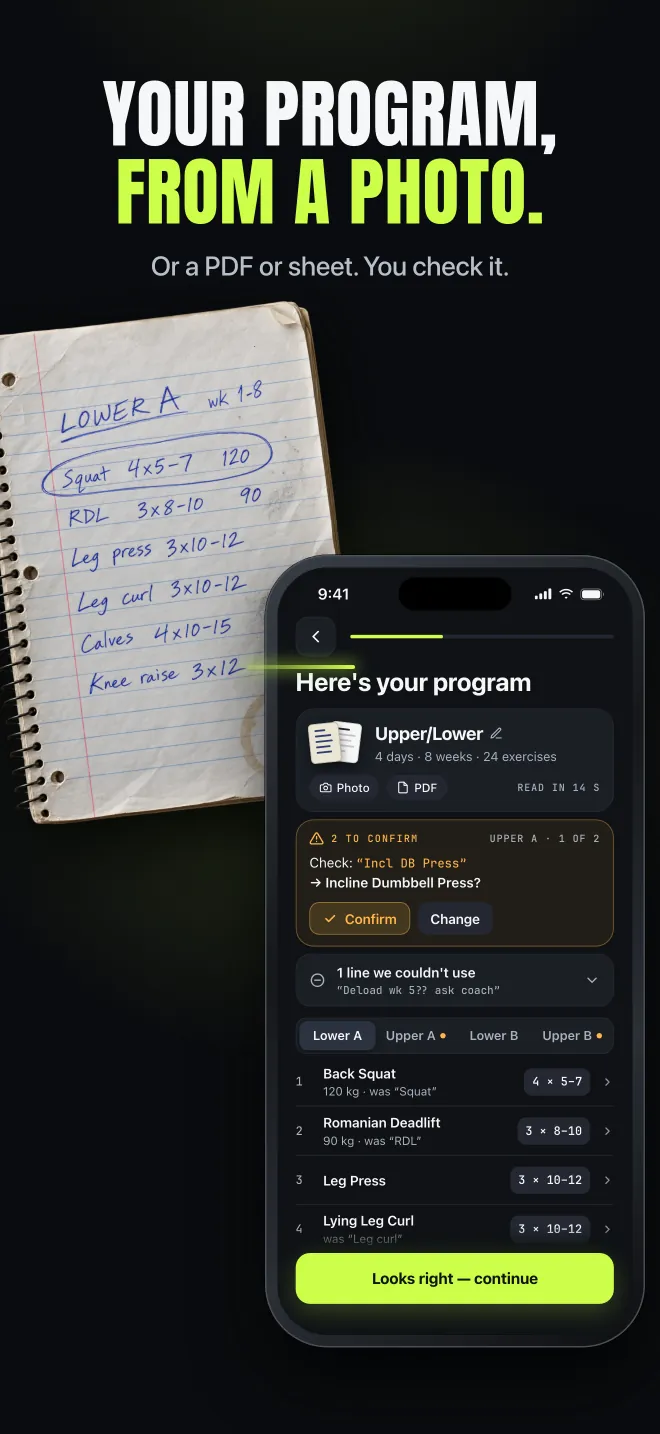
Fortium's import review screen: an Upper/Lower program read from a photo, with two lines flagged to confirm
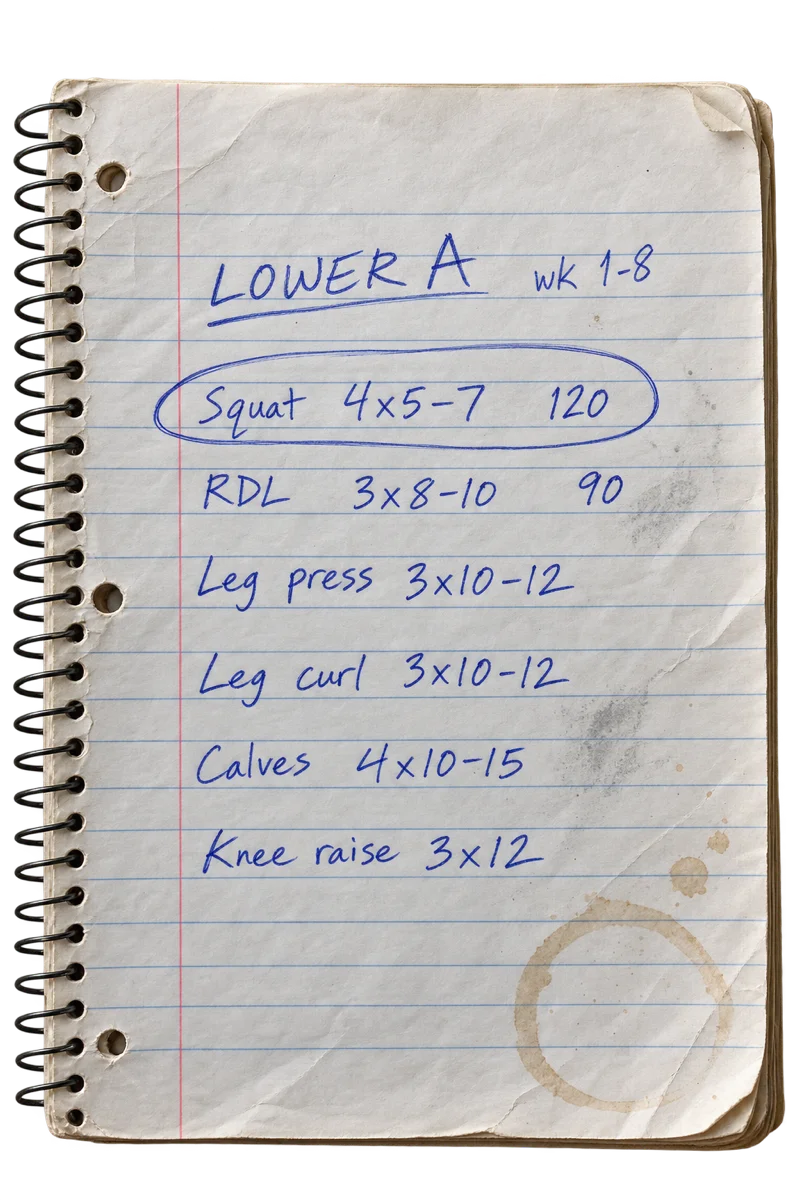
A handwritten Lower A program in a spiral notebook: squat, Romanian deadlift, leg press, leg curl, calves and knee raise, weeks 1 to 8

What Fortium does

  • Bring your program

    Photo, PDF, Word, Excel, screenshot or pasted text. You check every line.

  • Know what to lift next

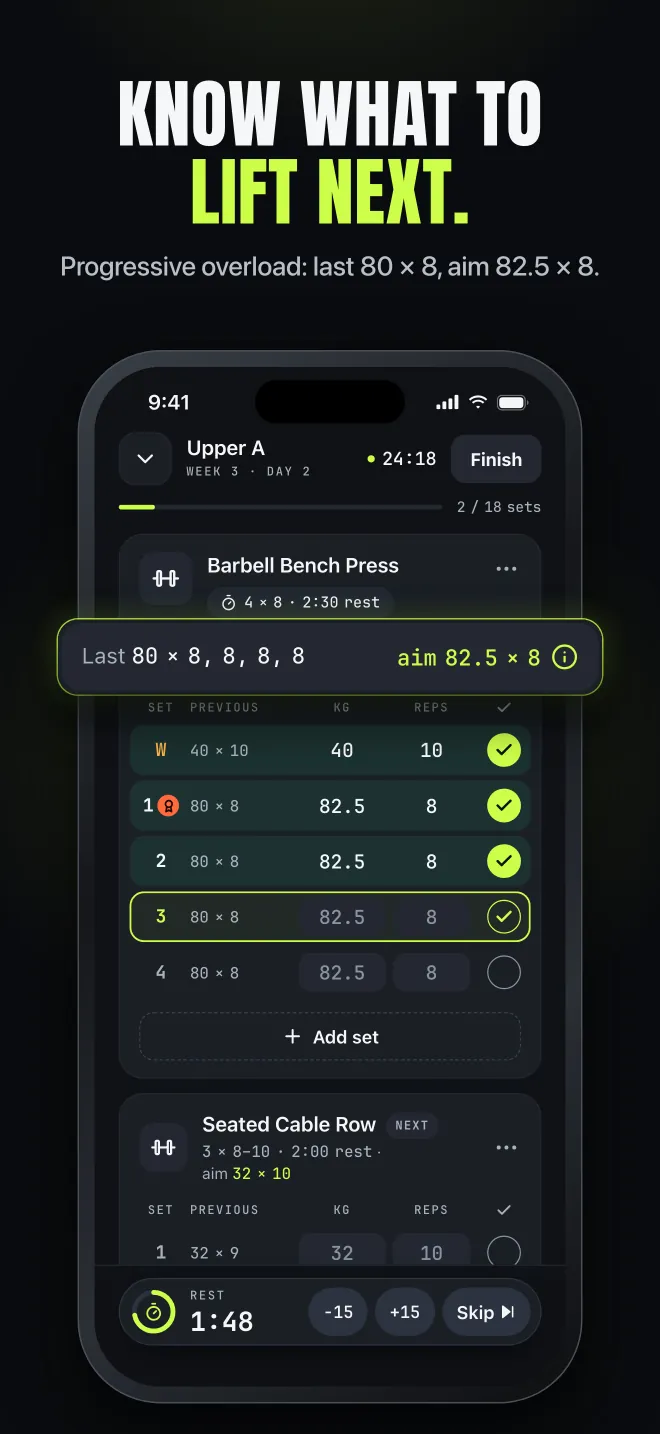
    Last 80 × 8 → aim 82.5 × 8. Progressive overload on every set, with the reason.

  • A coach that asks first

    It reads your log and proposes changes. Approve or decline.

How Fortium compares.

  • Runs the program you already follow

    Fortium
    Yes, from a photo, PDF or spreadsheet
    Typical gym log
    You retype it by hand
    Typical AI workout app
    Replaced with its own plan
  • A target on every set, with the reason

    Fortium
    Yes, free
    Typical gym log
    Rarely
    Typical AI workout app
    Often a black box
  • AI changes to your plan

    Fortium
    Only when you approve
    Typical gym log
    No AI
    Typical AI workout app
    Applied automatically
  • Logging and full history

    Fortium
    Free, no caps on history
    Typical gym log
    Often capped (routines or graph history)
    Typical AI workout app
    Usually behind a paywall
  • Ads and tracking

    Fortium
    None
    Typical gym log
    Varies
    Typical AI workout app
    Varies

“Typical” reflects common patterns across popular iPhone workout apps as of September 2026.

Features

  1. 01

    Your program, from a photo.

    Snap a notebook page, or add a coach's PDF, a Word or Excel file, screenshots or pasted text. Fortium reads it and flags every line it isn't sure about, showing what you wrote next to what it matched. Lines it can't use are listed, never silently dropped.

    • Photo
    • PDF
    • Word
    • Excel
    • Screenshot
    • Text
    Import review screen: a handwritten Upper/Lower program read from a photo, with two lines flagged to confirm
  2. 02

    Know what to lift next.

    After your first session, every set is pre-filled: last 80 × 8, today aim 82.5 × 8. One tap logs it. Each target comes with its reason, so you always know why the number moved. Free, on every set.

    Workout logger showing last time 80 × 8 and today's aim 82.5 × 8 on each set
  3. 03

    PRs, the moment they land.

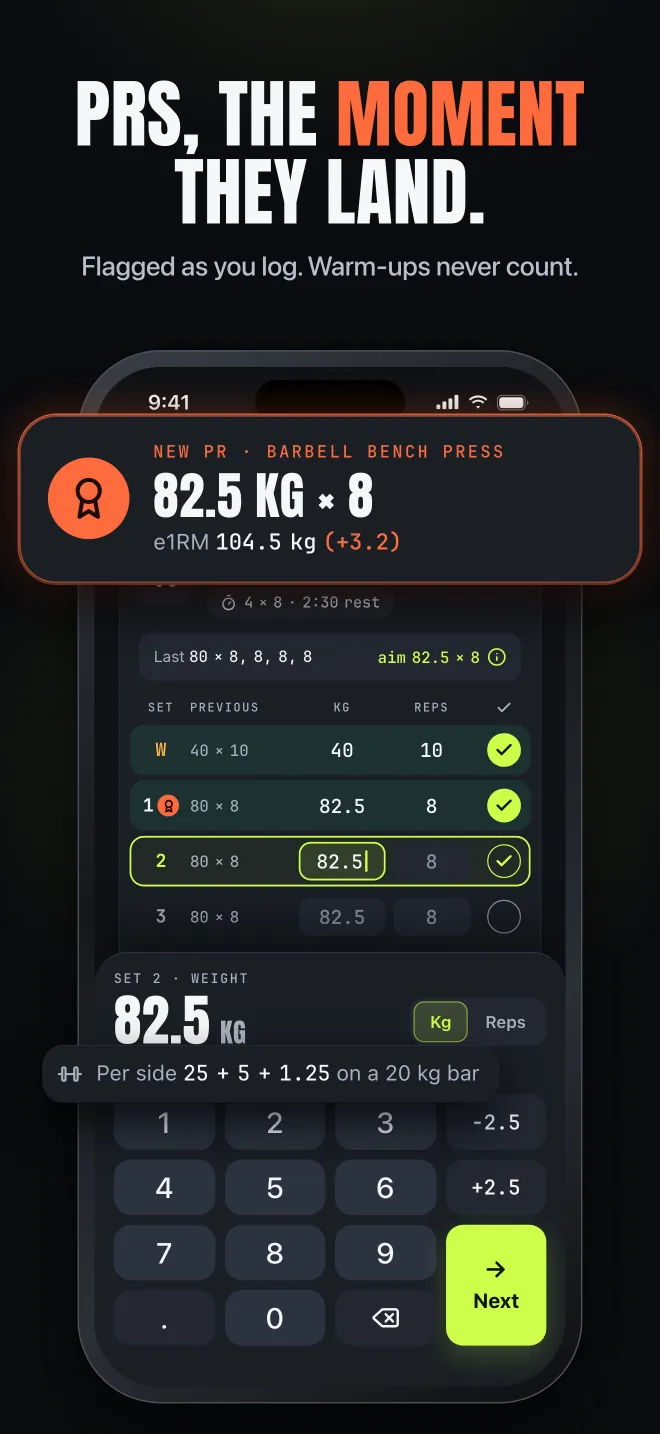
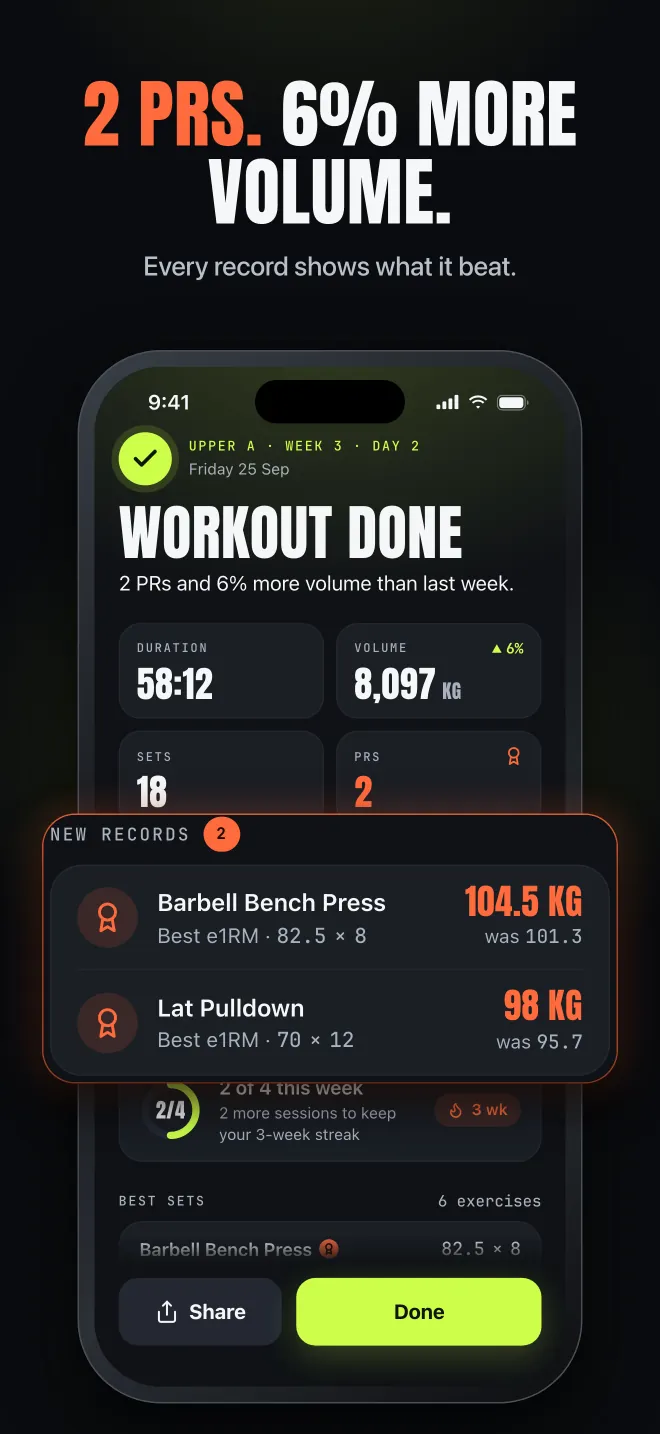
    Fortium celebrates a record the second you log it, with an estimated 1RM and plate math. Ties and warm-ups never count as PRs, so every record is a real one.

    New personal record banner, 82.5 kg × 8 on the bench press, with estimated one-rep max and plate math
  4. 04PRO

    A coach that reads your log.

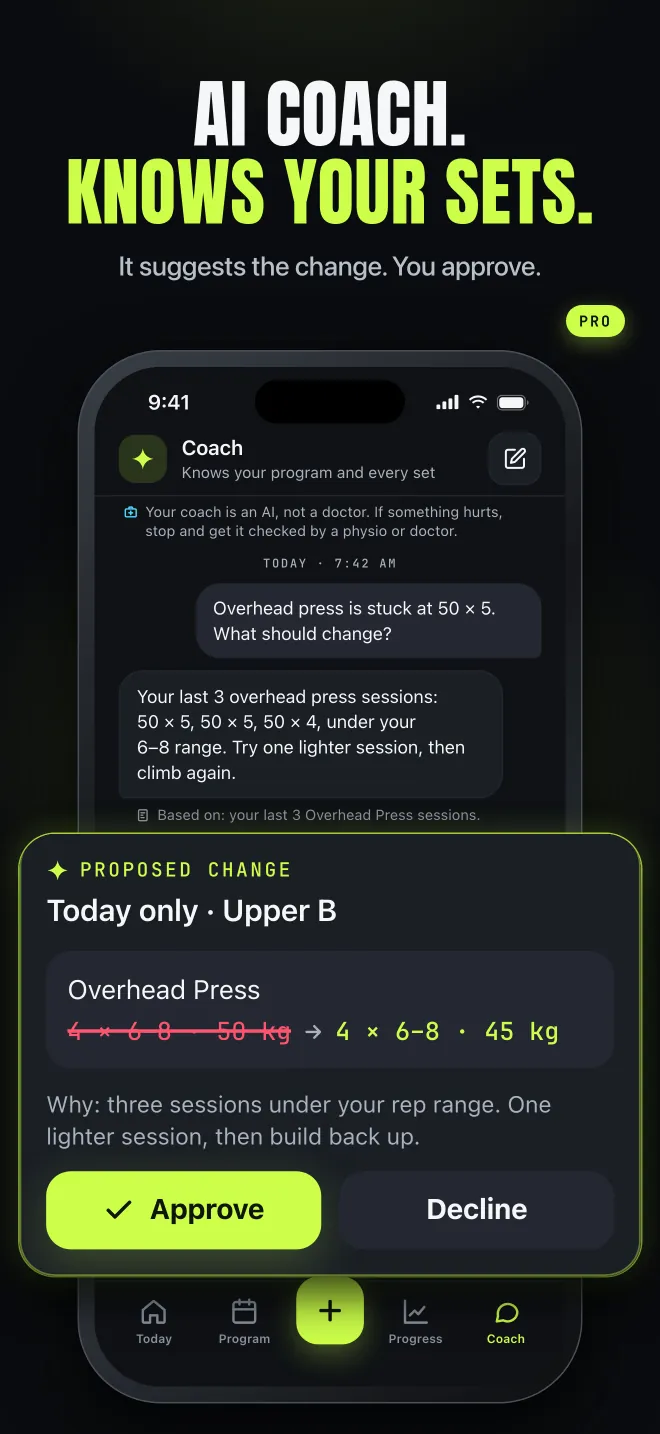
    Stuck on a lift? Ask. The AI coach looks at your recent sessions and proposes a change as a clear before/after: “Overhead press 50 kg → 45 kg next session, then climb again.” Nothing changes until you tap Approve.

    AI coach proposing a lighter overhead press session as a change you can approve or decline
  5. 05

    Your block, week by week.

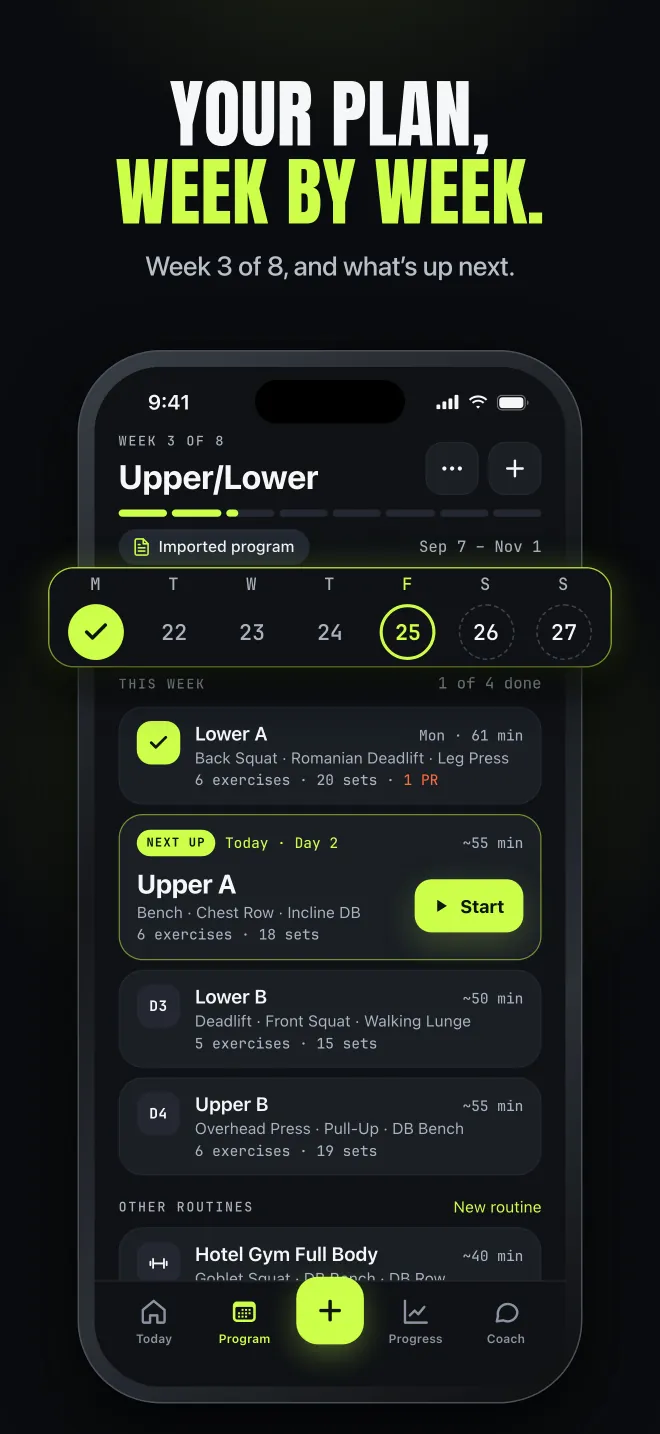
    An imported 8-week block runs as a real program: week 3 of 8, the right day next, and a rest timer that keeps counting when you lock your phone.

    Program tab showing week 3 of 8 of an imported Upper/Lower block
  6. 06

    Bring your old logs.

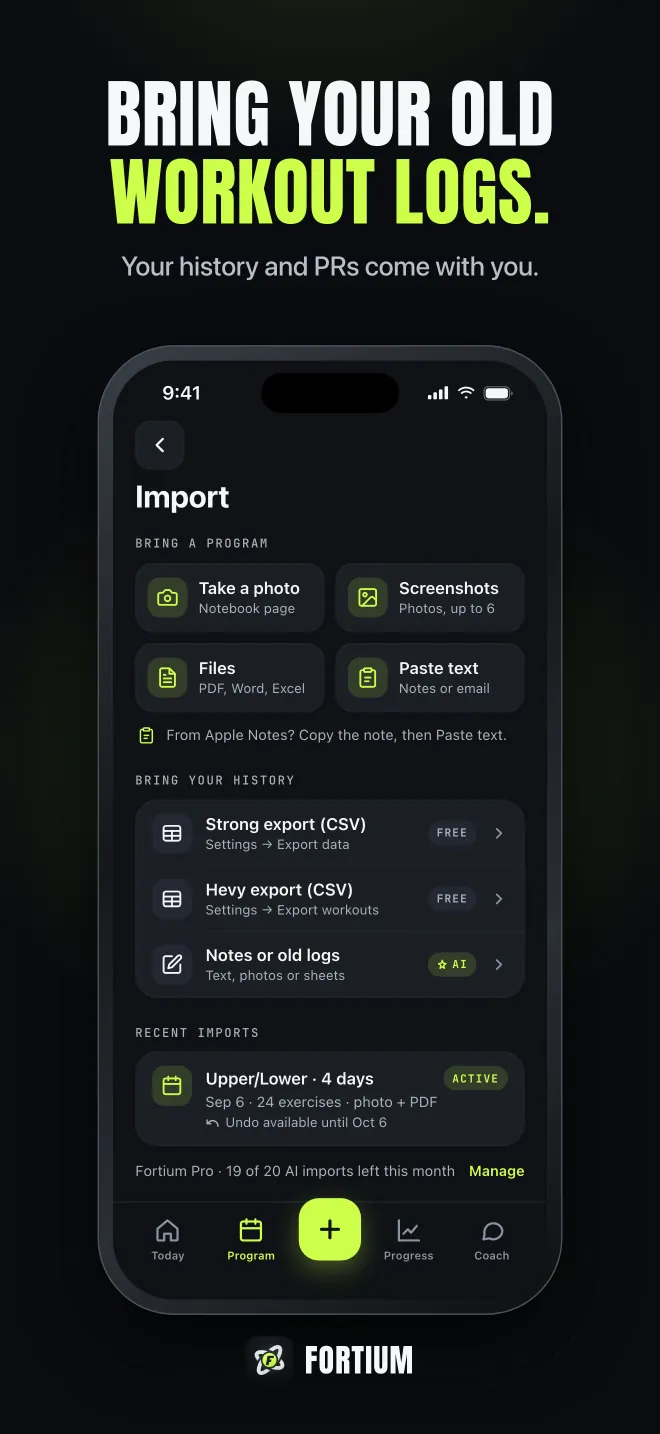
    Switching? Import your history from Strong or Hevy as a CSV file. Your PRs and “last time” numbers come with you, so targets are right from day one.

    How to switch
    Import screen for bringing workout history from Strong or Hevy CSV exports

How it works

From page to first set.

  1. Snap or upload your program

    A notebook page, a coach's PDF, a spreadsheet or a screenshot. No program? Answer a few questions and get one built, or pick a starter program.

  2. Check the flagged lines

    Fortium shows what it read and asks about anything unclear. You confirm, it saves.

  3. Train with targets

    Every set is pre-filled with what to lift next. One tap logs it. The rest timer keeps counting when you lock your phone.

  4. Adjust with your coach

    When a lift stalls, the AI coach proposes a change. You approve or decline.

See it in action.

  • Import review screen: a handwritten Upper/Lower program read from a photo, with two lines flagged to confirm
  • Workout logger showing last time 80 × 8 and today's aim 82.5 × 8 on each set
  • New personal record banner, 82.5 kg × 8 on the bench press, with estimated one-rep max and plate math
  • AI coach proposing a lighter overhead press session as a change you can approve or decline
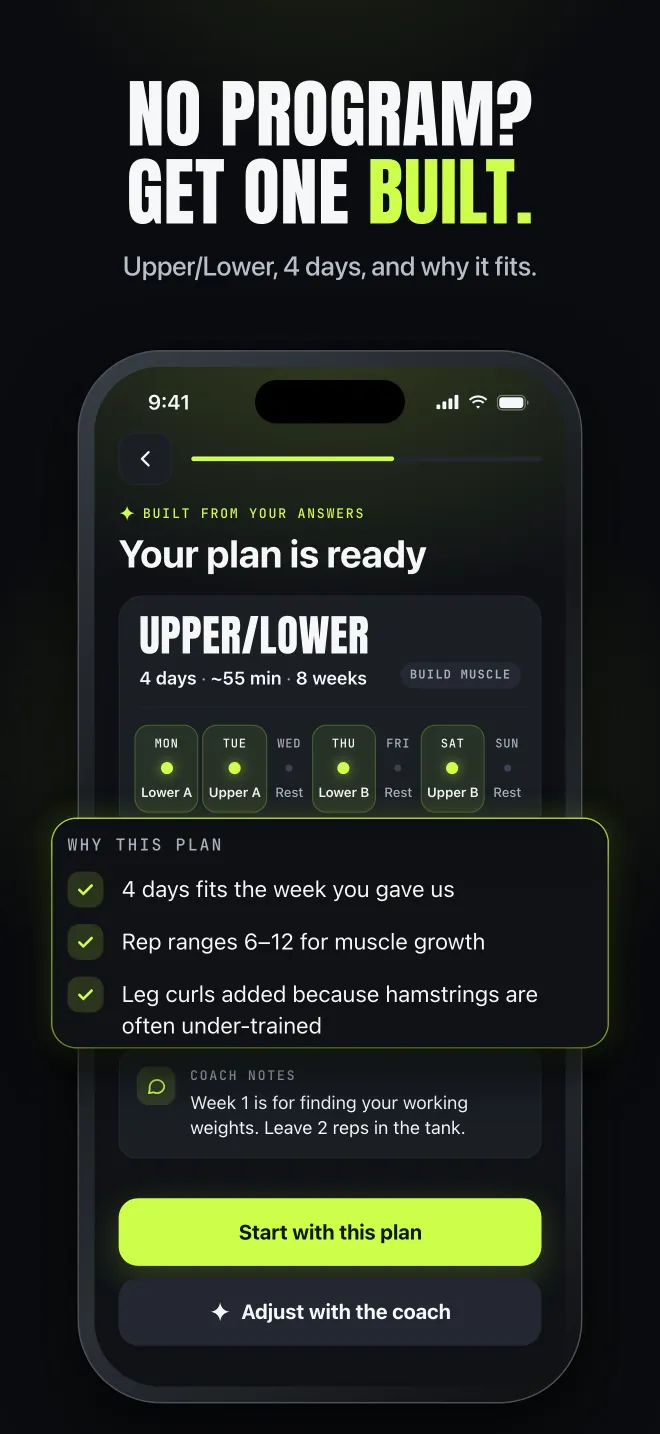
  • AI-built 4-day Upper/Lower plan with the reasons it fits
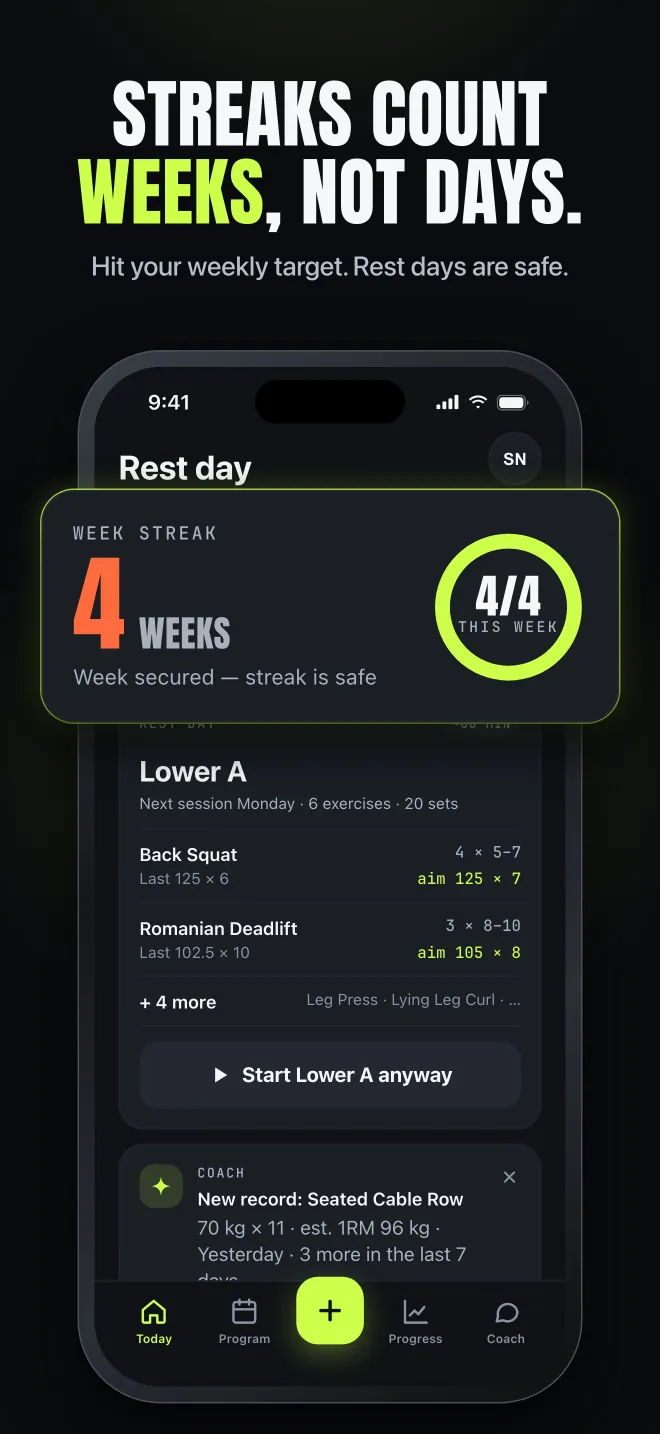
  • Today screen with a 4-week streak: this week's training target reached, so rest days are safe
  • Workout summary with two new records and 6% more volume than last week
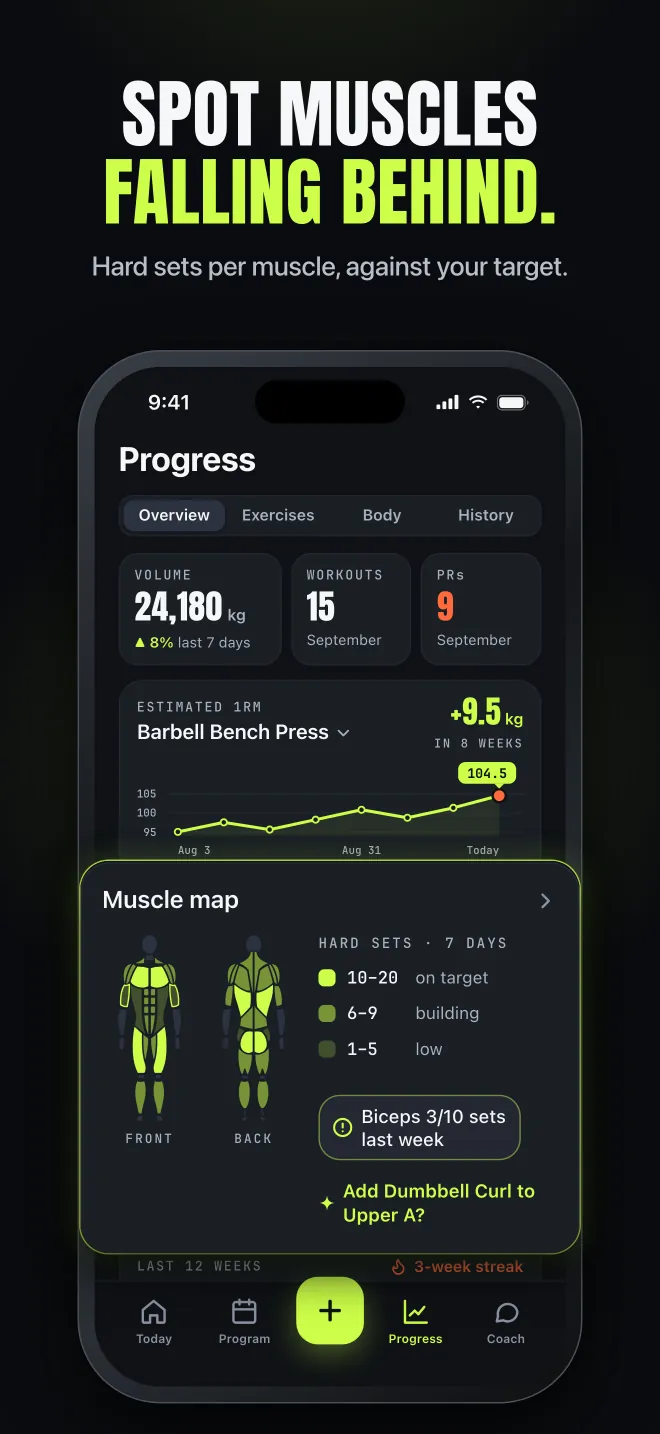
  • Progress screen with an estimated one-rep max chart and a muscle map of hard sets per muscle
  • Program tab showing week 3 of 8 of an imported Upper/Lower block
  • Import screen for bringing workout history from Strong or Hevy CSV exports

Who it's for.

  • Program followers

    A coach's PDF, a bought program, a Reddit favourite or your own notebook. Bring it as it is.

  • Switchers

    Coming from another tracker? Bring your CSV history and your PRs.

  • Starting out

    No program yet? Fortium builds a starting plan and explains why it fits. Built with AI, reviewed by you.

PRICING

Free where it counts.

Free

$0forever

  • Unlimited workout logging and your full history
  • Targets and progressive overload on every set
  • PRs, estimated 1RM and charts of your lifts
  • Rest timer, plate and warm-up calculators
  • A program of any length, run week by week, plus unlimited routines
  • Strong and Hevy CSV import
  • Export your data any time
  • One AI import or one AI-built plan, plus 5 coach messages

Fortium Pro

7-day free trial

$59.99/ year

or $11.99 / month

  • Everything in Free
  • AI coach that reads your log and proposes changes you approve (up to 150 messages in any 30 days)
  • Import every new block: up to 20 AI imports in any 30 days
  • Up to 15 AI-built plans in any 30 days
  • Weekly AI check-in
  • Muscle balance against your weekly target, 8-week muscle trends and your Strength Score

Your data is never locked. Logging, your history and export stay free.

US prices; your local price is shown in the App Store. The 7-day free trial is for new subscribers on the yearly plan and includes 5 AI imports, 3 AI-built plans and 40 coach messages. Payment is charged to your Apple ID. Subscriptions renew automatically unless cancelled at least 24 hours before the end of the current period; manage or cancel in your iPhone Settings. See our Terms of Use and Privacy Policy.

Your training data is yours.

  • No ads, no tracking, no data selling
  • AI only after you say yes, and you can turn it off
  • Export your history, or delete everything, from the app
  • No sign-up: start logging right away

FAQ

Questions, answered.

Is Fortium free?
Yes. Logging, your full history, targets, PRs, the rest timer, calculators, a program of any length and CSV import are free for good. Fortium Pro adds the AI coach, more AI imports and AI-built plans, and deeper analysis.
What can I import?
A photo of a handwritten page, a PDF, a Word or Excel file, screenshots or pasted text, in English. Fortium can't read Google Sheets links or videos yet. Workout history comes in from Strong or Hevy CSV exports.
What if Fortium misreads my program?
It shows every line it isn't sure about, next to what you wrote, and lists anything it couldn't use. Nothing is saved until you confirm.
Does the AI change my program on its own?
No. The coach proposes changes as a before/after. Nothing changes until you tap Approve.
Do I need an account?
No. Fortium starts right away with no sign-up, and your training backs up on its own to servers in the EU.
Is there an Apple Watch app?
Not yet. A simple Watch logger is planned after launch. Until then the rest timer keeps counting when you lock your phone, and a notification tells you when rest is over.
Is there an Android version?
Not at the moment. Fortium is iPhone only (iOS 18 or later).
What does the AI see?
Only what a feature needs: the files you import, your messages to the coach, your onboarding answers, a summary of your training and any injuries or limits you've told Fortium about, when they matter. Never your name, email or Apple Health data.How Fortium uses AI
When can I get it?
Fortium is coming soon to the App Store. Want early access? Email us.

Your program. Your numbers. Your call.

Coming soon to theApp Store

iPhone · iOS 18 or later

Questions? sviatoslav.nahirnyi@gmail.com